
Overview
Multi-Business account access allows you to securely access and manage multiple businesses under one login.
Easily switch between businesses directly within the DirectHub app, eliminating the need for mutliple log ins to make your life easier.
Within each business, you can make purchases specific to that business as well as view reporting for your campaigns
Creating an Additional Business
💡Pro Tip: If you have a single brand but multiple locations, no need to create a new business to purchase multiple products for your brand. Just add the products to your cart and adjust the quantity of each product to reflect the number of locations you have.
- Navigate to https://directhub.com/
- Click Sign Up/Login in the top right-hand corner.
- If this is your first time using DirectHub, you will need to create an account. If you have already signed in, sign in either by entering your email address or utilizing Continue with Google or Continue with Facebook.
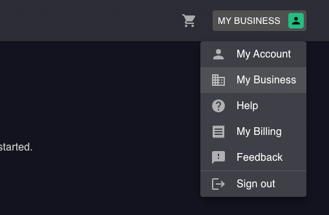
- Once logged in, click the menu in the top-right corner.
- If this is your first time logging in, click My Business. You will need to create your intial business first.
- If you have already made a purchase and created your business, click on your business name.
- Click My Business.
- Once you have created your first business, scroll down to "Other Businesses" and click Add Business.
- Enter in the name of your additional business, the website for the business (or click the checkbox that you don't have a website), and add in your business industry.
- Click Save.
- You will now see your additional business under "Other Businesses" 🎉
Switching Businesses
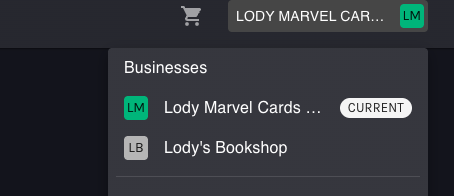
Easily switch between businesses to make purchases for each business as well as view reporting after your campaigns go live for each business. There are two places you can switch between businesses:
- From https://directhub.com/business, under "Other Businesses", click Switch next to the business you want to switch to.
- Anywhere in the app, click on your business name in the top right-hand corner and click on the business name you want to switch to.
If you have any further questions or need assistance, our support team is here to help. Contact us through DAVE, or email us at support@directhub.com.