
Table of Contents
Overview
Local grid scans and trend reports provide a clear, bird’s-eye view of how your business appears in local search results for specific keywords across your service area. By simulating searches from multiple nearby locations, the scan reveals exactly where your business is most visible and where there’s room to improve.
This data-driven approach gives a more accurate view of your local ranking performance than manual searches, using real Google user data to show how often your business appears in results.
Key Metrics in the Report
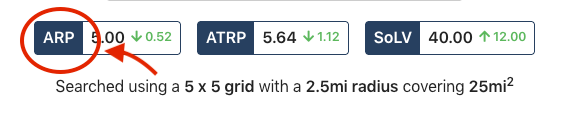
Below we will outline the key metrics for the Competitive Analysis report. At any time within the report, you can click on the dark blue metrics to view quick definitions.
Average Rank Position (ARP)
ARP shows your average ranking position across grid points where your business appeared in the top 20 results.
💡 Pro Tip: Lower ARP is better. It means you're closer to position #1.
Average Total Rank Position (ATRP)
ATRP shows your average ranking position across all grid points, even if your business did not appear in the top 20 results.
Comparing ARP vs ATRP helps determine if your business ranks well broadly across the grid or only in limited areas.
💡 Pro Tip: Lower ATRP is better.
Share of Local Voice (SoLV)
SoLV represents the percentage of grid points where your business ranks in the top three search results. This metric tracks your brand's visbility strength over time.
For example, if your SoLV score is 18.37, your listing appears in the top three results 18.37% of the time for the scanned area.
A SoLV score of 100 is ideal but rarely attainable due to competition.
💡 Pro Tip: Higher SoLV is better.
What is the Difference Between ARP and ATRP?
The ARP calculates an average based only on grid points where your business ranks within the top 20 positions.
ATRP includes all grid points, even where your business isn’t found (ranked 20+). This comparison helps identify whether your business ranks consistently across a wide area or performs well only near certain locations.
Example: If your ARP score is 17.38, your business typically appears around the 17th position among the top 20 listings, often near the center of the scanned area. If your ATRP score is 18, your average ranking position across the full area is around 18th.
Competitive Analysis Charts
Understanding the Graph
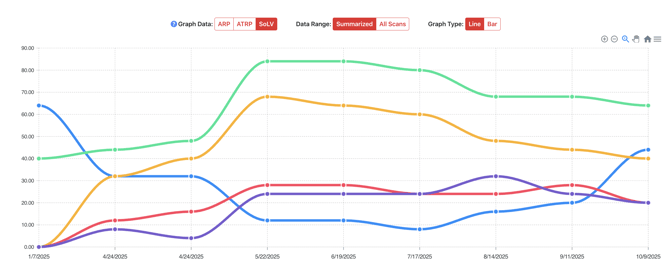
The line graph tracks ARP, ATRP, and SoLV over time, allowing you to measure changes in your local rankings month-to-month. It also lets you compare your business performance against top competitors in your market.
Understanding the Grid (Scan Explorer)
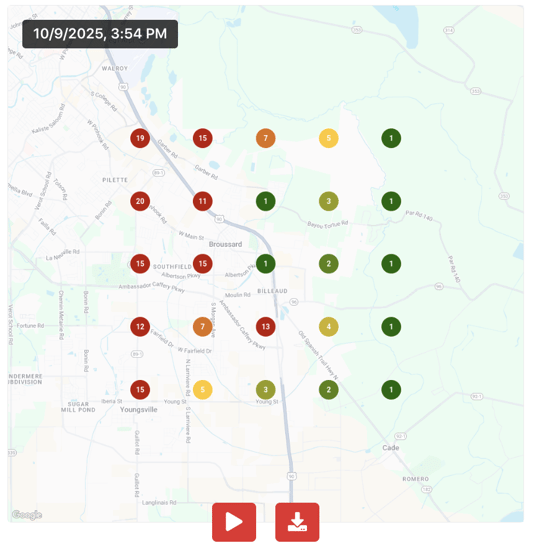
Below the Map Scan information and ranking scores, the Scan Explorer displays an interactive map showing the scanned area and each grid point.
-
Number Circles. Each point shows your ranking at that location. Lower numbersmean stronger rankings. For example, "1'" = the top spot in local search results.
- Color Coding:
- 🟢 Green (1-3): Strong visibility in top results.
- 🟡 Yellow (4-7): Moderate visibility, room to improve.
- 🔴 Red (8+): Low visibility.
- ⚠️ It is normal to see more red farther from your business since proximity is a major ranking factor.
Business Information Section
At the bottom of the Scan Report, you’ll see a list of competitors ranked by their SoLV score. The list includes competitor details such as address, review score, category, ARP, ATRP, and SoLV, along with how many grid points each was found in during the scan.
This provides a clear view of how your business compares to others for that specific keyword.
💡 Pro Tip: You can use the “Scan Results From” dropdown to compare monthly grid results. Since new scans are generated monthly, the URL automatically updates with the latest data, making it easy to track changes over time.
FAQs
-
Q: Why are scan results sometimes different from what I see in my browser?
-
A: Rankings vary based on several factors, including login status, search history, device location, and map zoom level. Our Competitive Analysis uses “clean” Google searches that aren’t influenced by previous activity, providing more objective data. Because everyone’s search results differ slightly, no scan will ever show a single “perfect” rank.
-
-
Q: How far can we set the radius for these scans?
-
A: Local SEO focuses on how your business ranks for searches within its immediate area. To keep data accurate and relevant, scans typically use a 2.5-mile radius. For rural businesses with larger service areas, the radius can be expanded up to around 5 miles to capture a broader view of visibility.
-
-
Q: How does the scan identify the business's top competitors?
-
A: The scan simulates searches for a chosen keyword across multiple grid points within a set radius, collecting the top local search results (usually the top 20 map pack listings) from Google at each point. It then aggregates all businesses that appear, tracks how often they show up, and calculates their ranking and visibility metrics. Competitors that appear most frequently or rank highest across the grid are identified as your top competitors for that keyword. These competitors are not selected manually but are based entirely on Google’s live search results, providing an accurate, data-driven view of your true local competition.
-